How to create shipping labels with MyParcel.
Getting started with MyParcel is simple. In five steps you go from a new account to labels that go out automatically: you connect your online store, set your preferences, define your shipping rules and print your labels. How much you automate is up to you.

Step 1. Create a free account.
our account is ready in a few minutes. You can ship without a subscription and pay only for what you send, or choose a MyParcel plan for sharper shipping rates and features like shipping rules, order processing and analytics. Whatever you choose, you can change it monthly.
From your account you create labels for parcels, letterbox parcels, mail, pallets and international shipments.

Step 2. Connect your online store or sales channels.
With one of the 30+ integrations, your orders come in automatically from your online store and your marketplaces. You don't need a developer for it, and you no longer have to copy address details.
No online store, or your platform isn't listed? Then you create your shipments directly in the platform, import your orders via CSV, or use the Chrome extension. Working with your own system? Then you build the integration through our API.

Step 3. Choose your carrier and shipping options.
For each shipment you choose the carrier, the parcel type and the shipping options. You can do that manually, or set it once in shipping rules: which carrier and which parcel type belong to which destination. After that, every shipment goes out according to that choice.
Shipping on your own contract? Connecting your PostNL contract is free. Contracts with DHL, UPS, DPD, GLS or Trunkrs you connect via MyContracts, along with your bol.com orders.

Step 4. Print your labels.
You print your labels from the MyParcel platform or straight from your own store software. In bulk too, with picking lists and packing slips included.
Step 5. Drop off your shipments or have them collected.
With the locations of PostNL, DHL, DPD and UPS, there's always a drop-off point nearby. The location finder in the platform shows you which ones.
If you'd rather not drop them off yourself, you book a pickup with PostNL, DHL, DPD or UPS. With DPD shipments to residential and business addresses, collection is included as standard.

After that: seeing what it costs you, and what it cost.
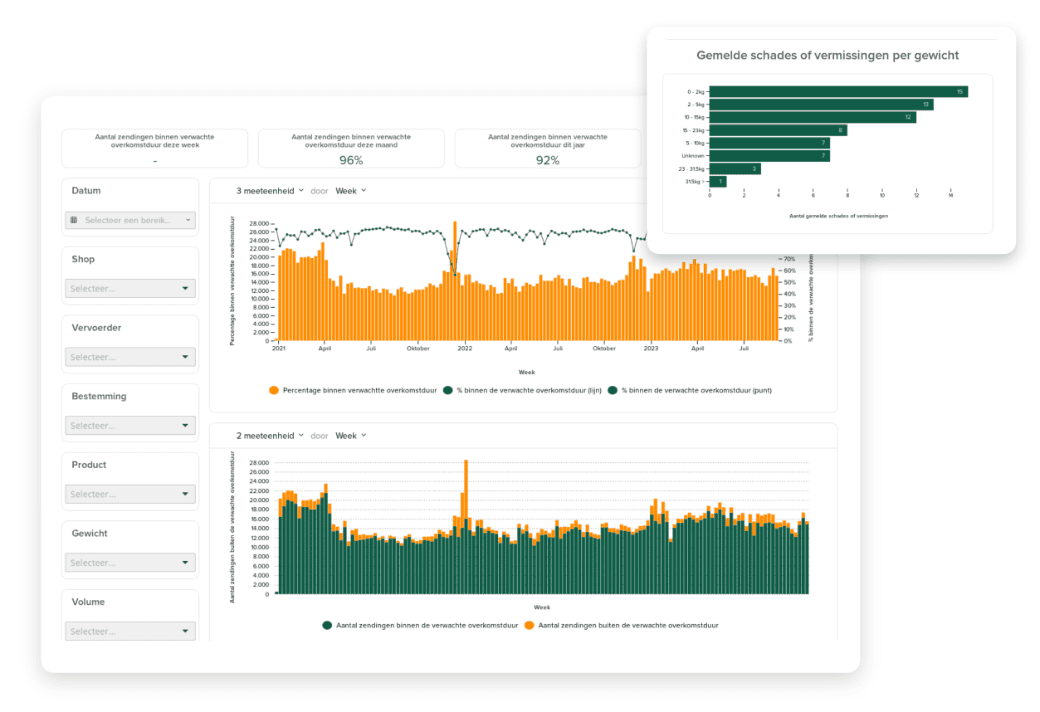
Once you've been shipping for a while, patterns appear in your data. MyAnalytics shows what you pay per carrier, product and weight, and which surcharges you can do something about. What you see there, you lock into your shipping rules.
How and when you pay.
You decide how you settle your shipping costs: direct debit, paying in advance, or paying afterwards.

Questions before you start?
Our support team is available six days a week. Call, chat, message or email us, and you'll get someone who helps you out.

Frequently asked questions.
Yes. You create your shipments directly in the MyParcel platform. An integration isn't required.
The platform costs you nothing and there are no label fees. You pay the shipping costs of your shipments.
Parcels, letterbox parcels, mail, pallets and international shipments.
Yes. With an integration you print your labels straight from your online store, or you work in the MyParcel platform. It's your choice.
Creating an account and installing an integration takes a few minutes. After that you create your first label.
Our support team is available six days a week by phone, chat, WhatsApp and email, at no extra charge.